Want to see RevSure in action
Schedule a 30-minute demo
Book a Demo

Back to Templates



Understand how accounts move from engagement into pipeline
Imagine closing a quarter and realizing the engagement data you relied upon masked several stalled deals, resulting in missed revenue targets and frustrated stakeholders. In B2B growth, engagement by itself does not lead to revenue. Accounts interact on different channels, show intent at various times, and move through the sales funnel at different speeds. Many teams still struggle to see how these engagement signals turn into real pipeline progress. Without this insight, it is difficult to know which accounts need attention, where deals are stuck, or which channels are truly helping opportunities advance.
RevSure’s Account Progression Template instantly surfaces which accounts are likely to convert next. It solves the problem of scattered engagement signals by giving a clear account-level view of engagement, funnel progress, pipeline details, and channel impact. This helps teams see how accounts move from early engagement to an active pipeline and shows where taking action can have the most impact.
The Account Progression Template is built for B2B teams that need clear, actionable visibility into how accounts move from engagement into pipeline. ABM and demand generation teams use it to track account-level engagement and progression signals, allowing them to act quickly on intent surges, stalled movement, or early-stage drop-offs before opportunities are lost.
Sales and RevOps teams rely on the template to identify accounts that require immediate action, understand where leakage occurs in the funnel, and accelerate opportunity velocity by focusing effort where it will have the greatest impact. Marketing leaders and executive teams use it to assess the true impact of campaigns and channels on account movement, pipeline contribution, and ROI—ensuring marketing investment is aligned with revenue outcomes, not just activity.
Rather than reviewing engagement metrics, pipeline reports, and channel performance in isolation, the Account Progression Template brings them together in a single view. This shared perspective improves collaboration across teams, strengthens qualification and handoffs, and reduces costly misalignment that can cause deals to stall or be lost. By focusing attention on the accounts most likely to convert, teams save time, protect revenue, and drive more predictable pipeline growth.
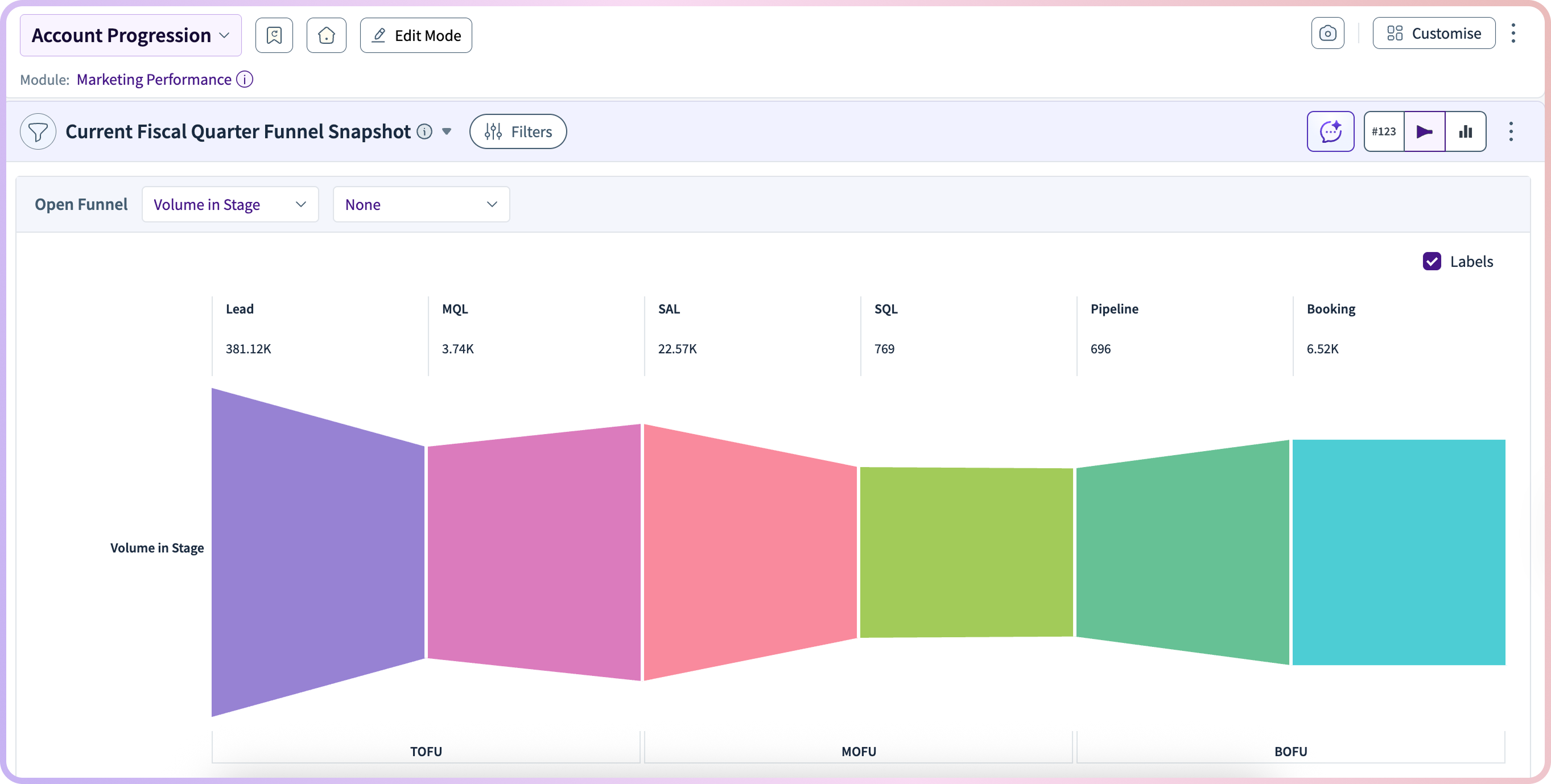
The template starts with a funnel snapshot that shows how many accounts are at each stage, from lead to closed won. This makes it easy to see where accounts are moving forward and where they are dropping off. Teams can quickly spot where qualification, follow-up, or handoffs need improvement.
Along with funnel progress, the template tracks how accounts engage across channels like LinkedIn, email, and website visits. By watching these trends over time, teams can notice when interest is rising or falling and modify their outreach, timing, or content as needed. For instance, if there is a considerable increase in engagement on LinkedIn, such as multiple interactions in a short period, the team could trigger a timely LinkedIn InMail to capitalize on this rising intent. This concrete play assures that the team takes advantage of engagement spikes, making their efforts more targeted and impactful.
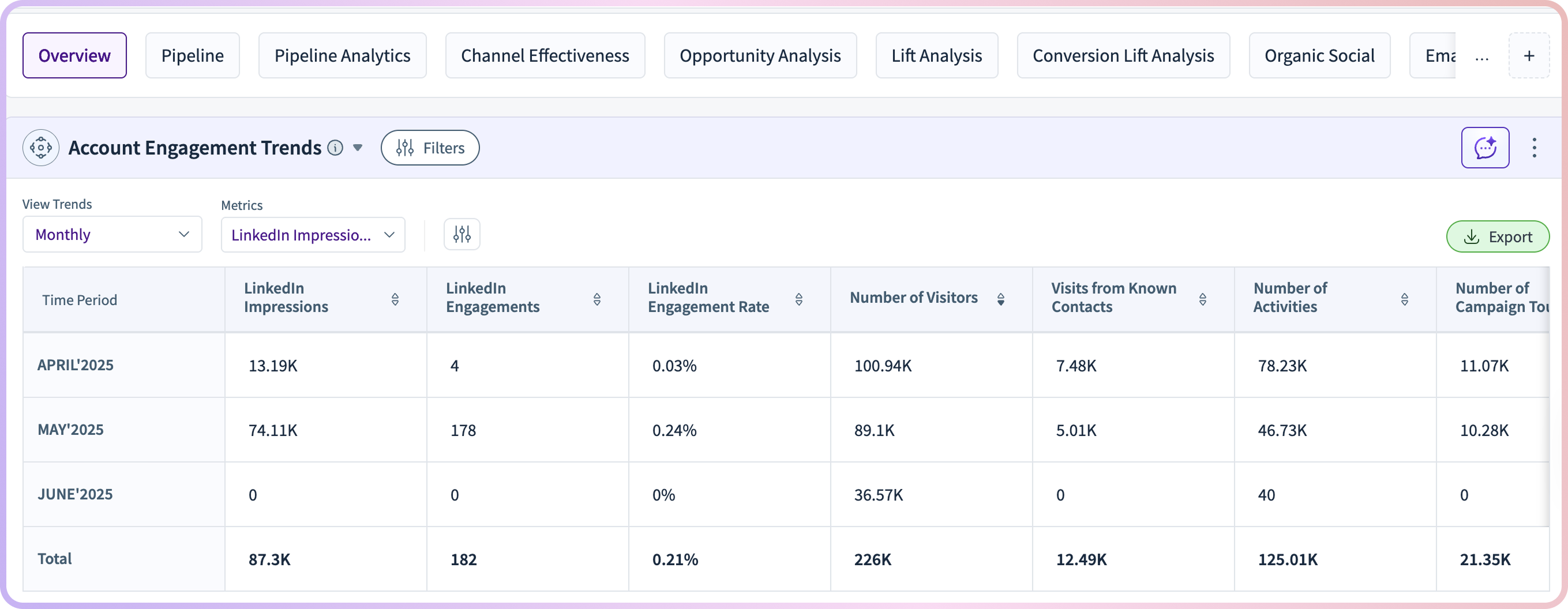
These views link engagement signals directly to funnel movement, instead of treating them as separate metrics.
After the first snapshot, the Account Progression Template provides a clearer and more intuitive view of the pipeline dynamics. Imagine a heat map illustrating pipeline value and age, segmented by stage and quarter. This graphical representation helps teams quickly identify where deals are clustered and pinpoint stages where they often get stuck. By translating data into a mental image, stakeholders are able to more easily recognize bottlenecks and act quickly to address them.
The template also looks at the pipeline by account size, so teams can prioritize based on deal value, speed, and chance of winning. This helps focus resources on accounts with the most revenue potential and modify plans for smaller or slower deals.

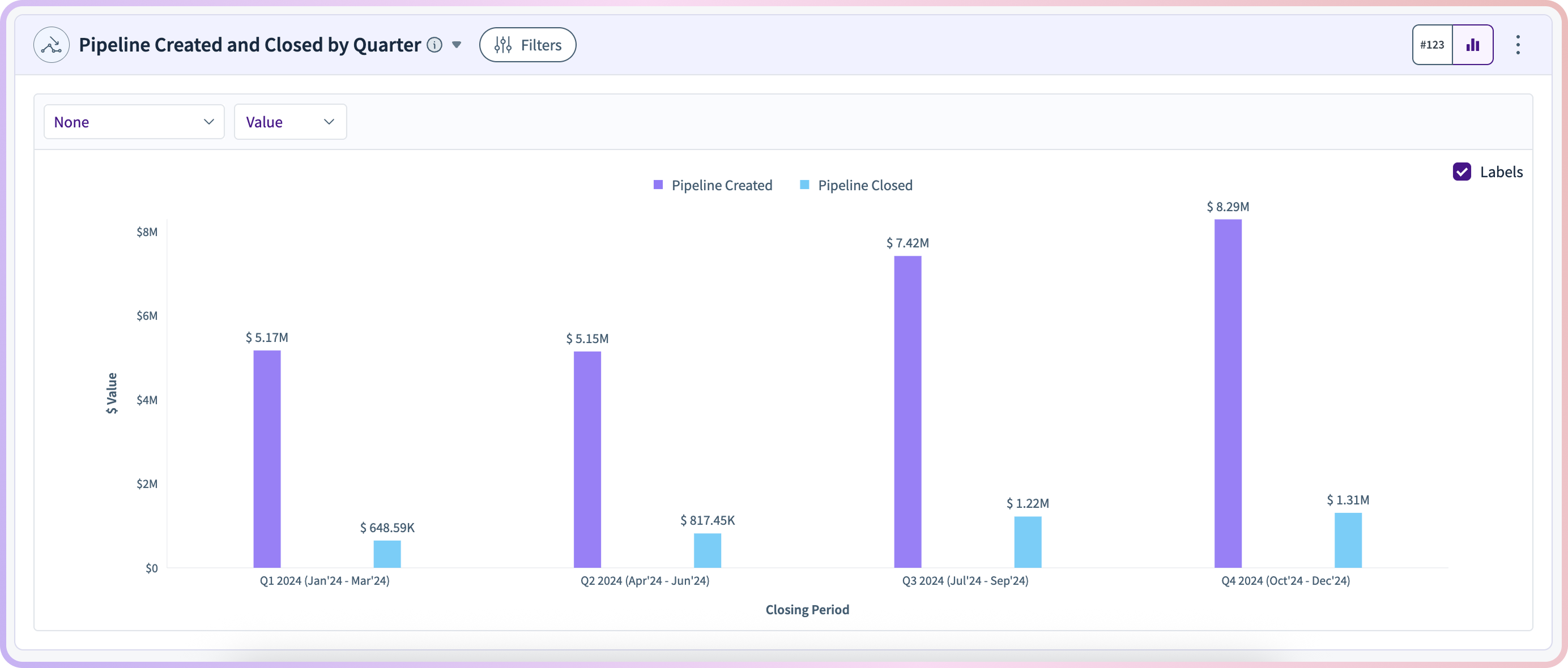
To measure momentum, the template compares how much pipeline is created versus how much is closed. This gives leaders a clear view of whether the pipeline is growing or shrinking over time.
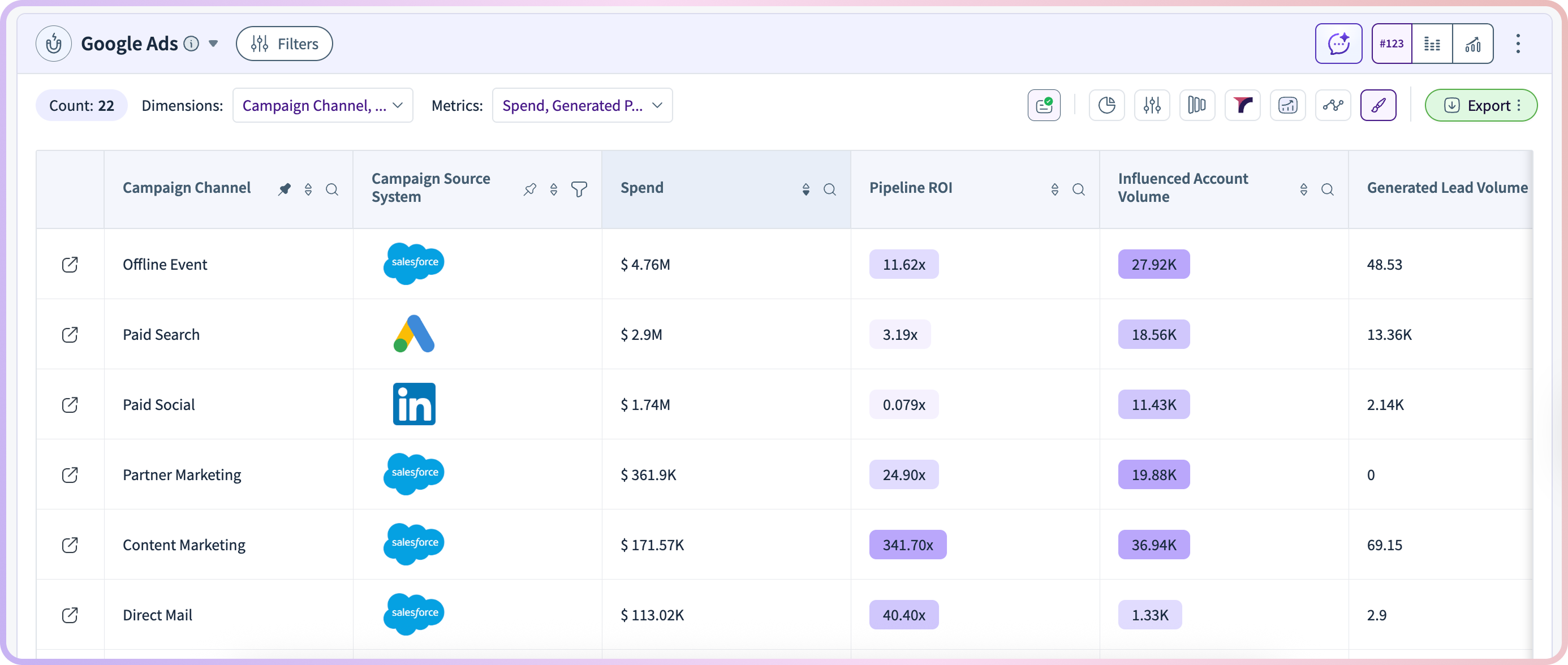
To help teams use these insights, the template includes comprehensive breakdowns that show ROI and impact for each channel. Teams can see which channels are helping accounts move forward and which ones might need improvement.
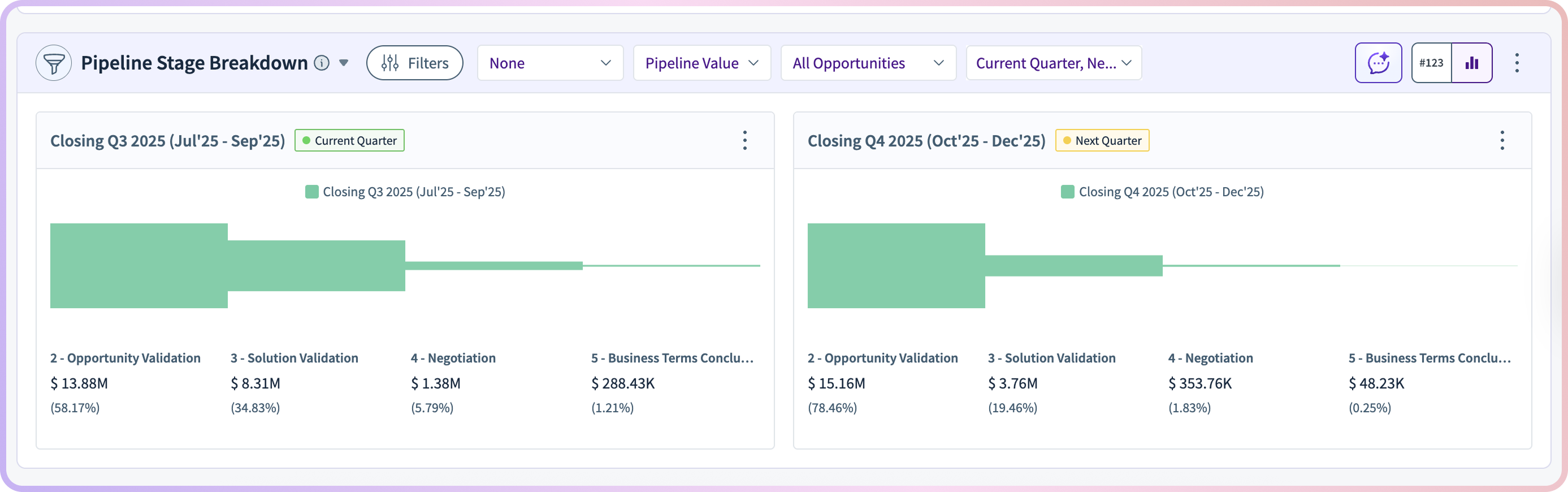
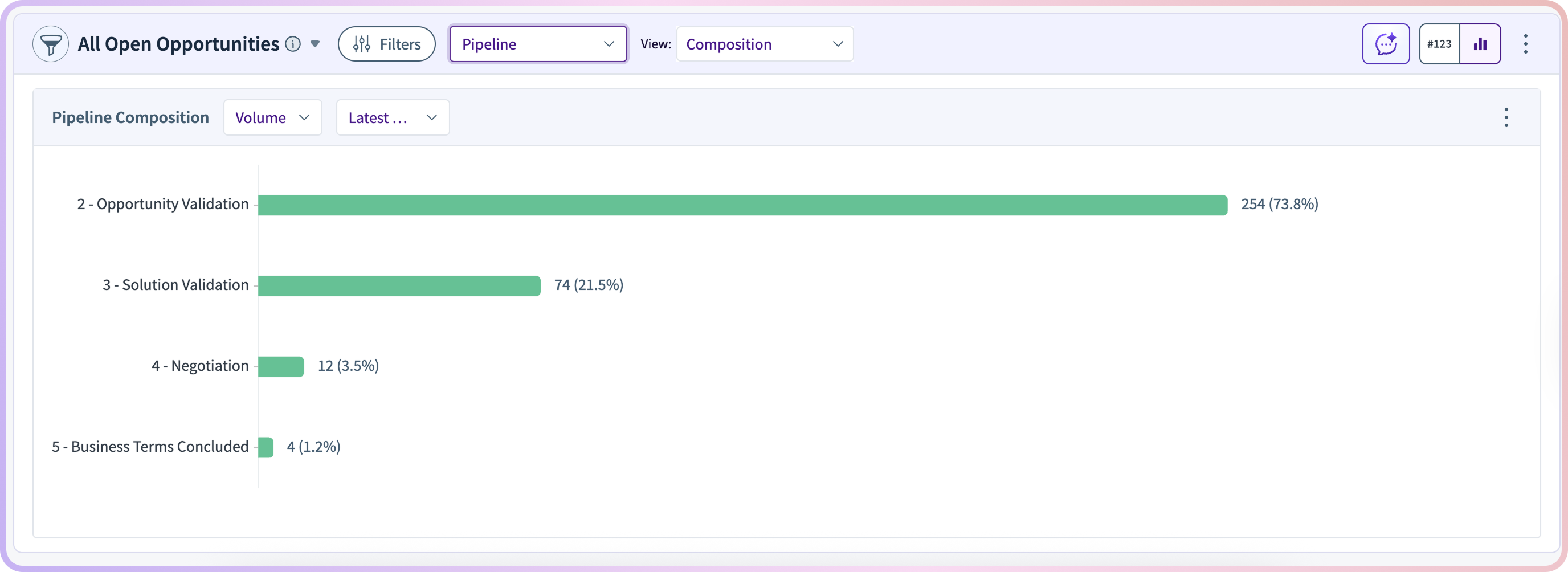
It also provides stage-level visibility through open opportunity composition views, helping teams understand where active deals sit in the funnel and allowing targeted pipeline actions.
In practice, teams use these views to:
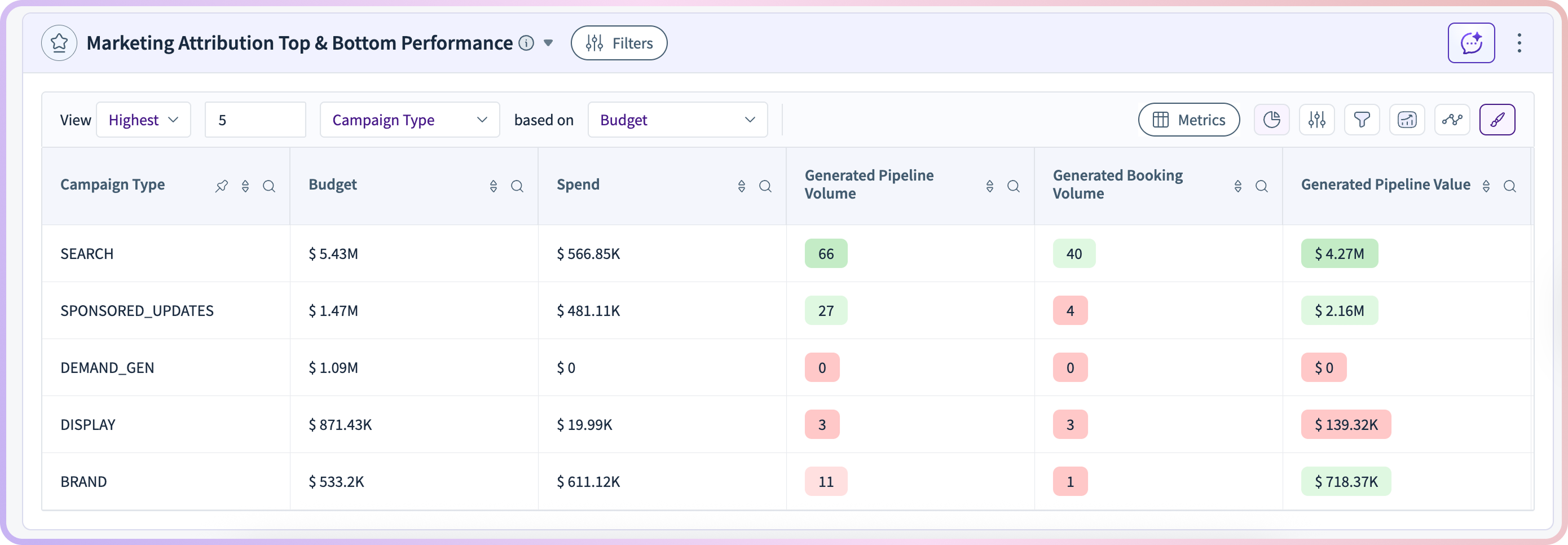
The Account Progression Template helps teams look past basic engagement data to see how accounts really move toward revenue. By bringing together engagement trends, funnel progress, pipeline details, and channel impact, it gives teams the clear insights they need to act confidently.
Revenue leaders gain visibility into pipeline health, marketing teams see which efforts move accounts forward, and sales teams know where to focus next, all without relying on intuition or disconnected reports.
Ready to take the next step? If you use RevSure, try the Account Progression Template to see how your accounts move from engagement to pipeline and use those insights to drive more predictable revenue. If you are not a RevSure customer yet, book a demo to see the template in action.
What is an account progression?
An account progression is a reporting framework that shows how accounts move from engagement into the pipeline. It connects engagement signals, funnel stages, and pipeline data to track account-level progression.
How do you track account progression in B2B?
Account progression is tracked by analyzing how accounts move through funnel stages, combined with engagement signals and pipeline activity across channels.
Why is engagement data alone not enough?
Engagement metrics show activity but do not indicate whether accounts are progressing toward pipeline or revenue, making it difficult to identify stalled deals or prioritize action.
What insights does the Account Progression Template provide?
It shows how accounts move through the funnel, where deals are getting stuck, which accounts are likely to convert, and how channels influence progression.
How does this template help identify stalled deals?
It highlights pipeline age, stage-level drop-offs, and accounts with high engagement but low progression, making it easier to spot and act on stalled opportunities.
Who should use an account progression template?
Sales teams, RevOps, marketing teams, and revenue leaders use it to monitor pipeline health, prioritize accounts, and improve conversion across the funnel.
How does account progression relate to pipeline growth?
Account progression shows how engagement turns into opportunities, helping teams focus on accounts most likely to convert and ensuring a steady pipeline.
Can you analyze account progression by channel?
Yes, the template shows how different channels influence account movement, helping teams identify which channels drive progression and optimize outreach strategies.
How does this differ from traditional pipeline reporting?
Traditional pipeline reports show deal status, while an account progression template connects engagement, channels, and funnel movement to explain why deals are progressing or stalling.
What metrics are important for tracking account progression?
Key metrics include funnel stage movement, pipeline velocity, deal age, engagement signals, conversion rates, and channel influence on account progression.